Emulators
SuperFW supports certain console emulators for the GBA. In fact, it ships a built-in copy of Jagoomba Color so that it can load and play GameBoy and GameBoy Color ROMs out of the box (except for Supercard Lite version, which requires you to install it).
For other emulators it is necessary to download and install them in the SD card. The “chis” variant ships built-in emulators for most platforms, so you don’t have to install them in order to use them.
Compatible emulators
| Platform | Emulator | ROM file | Website |
|---|---|---|---|
| Nintendo NES | PocketNES | .nes |
dwedit.org/gba/pocketnes.php |
| SG-1000 | SMS Advance | .sg |
archive.org/details/smsadvance-25-bin |
| Sega Master System | SMS Advance / DrSMS | .sms |
www.webpersona.com/drsms |
| Game Gear | SMS Advance / DrSMS | .gg |
|
| NeoGeo Pocket Color | NGPGBA | .ngc |
github.com/FluBBaOfWard/NGPGBA |
| Watara Supervision | WasabiGBA | .sv |
github.com/FluBBaOfWard/WasabiGBA |
| Game Boy (Color) | Goomba(Color) | .gb/gbc |
dwedit.org/gba/goombacolor.php |
| PC Engine (PCE) | PCEAdvance | .pce |
github.com/patters-match/pceadvance |
Installation
Installing the emulators is as simple as downloading the release binary
(a .gba ROM file) and copying it to the .superfw/emulators/ directory.
The files must have the right name so they can be found by SuperFW, namely:
| Emulator | File | Download link | Mirror |
|---|---|---|---|
| PocketNES | pocketnes.gba | https://www.dwedit.org/gba/pocketnes.php | |
| SMS Advance | smsadvance.gba | https://archive.org/download/smsadvance-25-bin ⚠️ | v2.5 patched |
| DrSMS | drsms.gba | https://www.webpersona.com/drsms/downloads.html ⚠️ | v6.0 patched |
| NGPGBA | ngpgba.gba | https://github.com/FluBBaOfWard/NGPGBA/releases | |
| WasabiGBA | wasabigba.gba | https://github.com/FluBBaOfWard/WasabiGBA/releases | |
| Goomba | gbc-emu.gba | https://www.dwedit.org/gba/goombacolor.php | |
| PCEAdvance | pceadvance.gba | https://github.com/patters-match/pceadvance/releases | v7.5 patched |
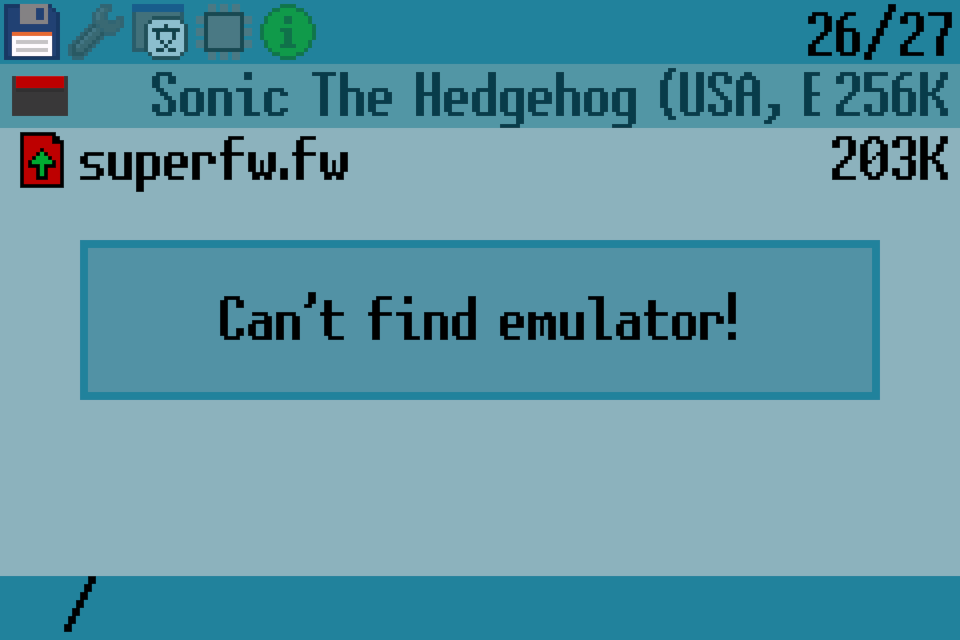
If the emulator binary is not properly installed you might see an error message when launching a ROM.
Playing ROMs
To use any of the emulators, simply browse the desired ROM (as you do with GBA ROMs) and press A to load it. SuperFW will load the emulator binary as well as the ROM and launch it.
Save games
Most GBA emulators assume that the cartridge has SRAM storage, for the purposes of
storing savegames as well as savestates (if/whenever they are supported). SuperFW
will write the SRAM contents to a .sav file on reboot, to preserve its contents.
For some emulators like GoombaColor / PocketNES / SMSAdvance you will need to exit the emulator gracefully to ensure the save game is written correctly: press L+R and pick Exit and the emulator will reset your GBA. You should see the game being saved to the SD card, once that is complete, you might shut down your device.
These emulators usually use a non-standard save format, specific to them. If you need to convert from/to a regular (raw) format, you might wanna use a converter (for instance https://savefileconverter.com/#/flash-carts by picking GBA and your emulator name).